
Written By: | Grace Orende |
|---|---|
Manufacturer: | Intlx Solutions |
Product: | Intlx360 |
Date: | February 19, 2026 |
CM Command Monitoring & Compliance
The CM Command Monitoring & Compliance dashboard provides centralized visibility into administrative command activity across the Avaya Communication Manager (CM) environment. It is designed to support operational governance, change management, and audit readiness by tracking both SAT (System Access Terminal) commands and underlying Bash/server-level actions executed on CM systems.
By consolidating command execution metrics, user activity, and historical change logs, this dashboard enables teams to maintain configuration control, ensure accountability, and quickly investigate system changes that may affect platform behavior. It serves as both a real-time monitoring tool and a historical audit layer for controlled management of Communication Manager environments.
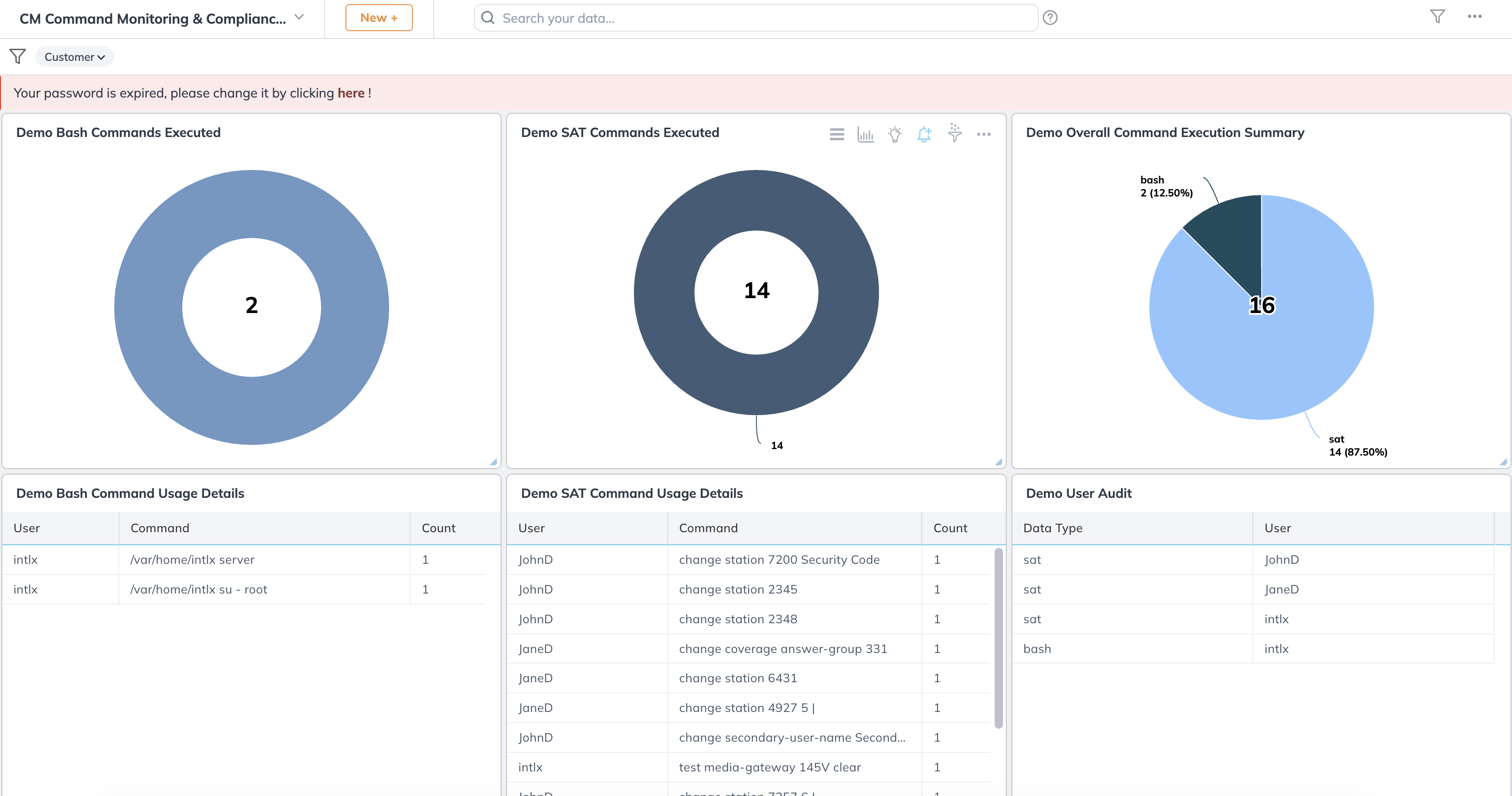
CM Command Monitoring & Compliance Dashboard
1. Bash Commands Executed
This donut chart displays the total volume of Bash-level commands executed on the CM server environment. These commands typically represent system-level administrative actions such as maintenance tasks, server access operations, or backend troubleshooting. Monitoring Bash activity is important for identifying privileged interactions that occur outside the standard application interface.
2. SAT Commands Executed
This panel shows the number of SAT (System Access Terminal) commands executed within Communication Manager. SAT commands are used to perform configuration updates such as modifying stations, coverage paths, user settings, and system parameters. Tracking SAT command activity helps ensure that configuration changes remain controlled and traceable.
3. Overall Command Execution Summary
This summary visualization provides a comparative breakdown of total command execution by type (SAT vs Bash). It offers a high-level view of administrative activity patterns and helps teams quickly assess whether changes are primarily configuration-driven or system-level.
4. Bash Command Usage Details
This table logs detailed metadata for Bash command executions, including the user, command path, and execution count. It supports operational transparency by allowing teams to review which system-level commands were run and by whom, improving accountability and facilitating post-change reviews.
5. SAT Command Usage Details
This table provides a detailed view of SAT commands executed by specific users, including the exact command and frequency. It is particularly useful for reviewing configuration modifications, validating authorized changes, and ensuring adherence to internal change management processes.
6. User Audit
The User Audit panel categorizes command activity by data type (SAT or Bash) and user. This creates a clear accountability framework by showing which users are performing configuration versus system-level actions, supporting internal audits and governance requirements.
7. CM Bash Change Management History
This historical log tracks Bash-related change events across CM assets, including company, asset, user, command executed, execution count, and return cause codes. It enables teams to review server-level interventions over time and supports forensic investigation when analyzing system behavior or unexpected changes.
8. CM SAT Change Management History
This table serves as the authoritative history of configuration changes executed through SAT. It captures the asset impacted, user, command issued, execution frequency, and status/cause fields. This panel is essential for maintaining a structured audit trail of system configuration activity and ensuring that all changes are documented, reviewable, and aligned with established change control practices.